Photography Canva Website Templates: Build a Stunning Online Presence Without Coding
Photography Canva Website Template In the modern visual economy, photographers don’t just take pictures — they sell experiences, emotions, and stories. Whether you’re a wedding photographer capturing joy, a lifestyle artist documenting everyday beauty, or a nature specialist preserving light and landscape, your website is your digital storefront. But not everyone has the skills, time, or budget to hire professional web designers. That’s where Photography Canva Website Templates come in — they empower photographers and creative professionals to launch beautiful, functional websites quickly and easily, without writing a single line of code.
What Are Photography Canva Website Templates?
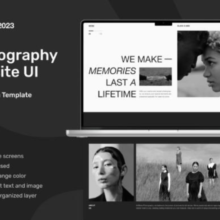
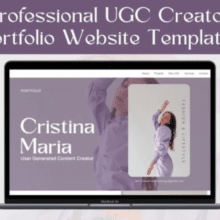
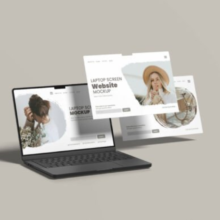
A Photography Canva Website Template is a pre-designed website layout that you can customize directly in Canva’s drag-and-drop editor. Instead of building a site from scratch using complex tools like WordPress or coding, you start with a professional design and swap in your own photos, text, and brand elements to instantly create a polished online portfolio or business site. These templates often come as digital downloads (usually via a PDF with a Canva link) and are fully editable in your Canva account.
Unlike traditional website builders, Canva’s platform simplifies design so anyone — even beginners — can create a website that works beautifully across devices and showcases their work in the best possible light.
Why Canva Website Templates Are Perfect for Photographers
Photography is visual by nature, and the best photography websites focus on showing images first. Canva website templates are ideal for photographers for several reasons:
1. Zero Coding Required
Most photographers are not web developers. Canva handles layout, responsiveness, and publishing without requiring HTML, CSS, or JavaScript. You simply edit visually in Canva’s interface and publish.
2. Fast, Cost-Effective Setup
Hiring a web designer can be costly and time-consuming. A Canva template lets you launch your site within hours instead of weeks — and often at a fraction of the price of custom web design.
3. Beautiful Portfolio Focus
Templates are designed to put your work front and center with large hero images, gallery sections, and lightboxes that let visitors experience your photography the way it was meant to be seen.
4. Flexible and Fully Customizable
Every template lets you customize fonts, colors, layout, and images so your site reflects your brand. Strong visuals and consistent branding build trust with potential clients.
5. Publish Instantly
Once your design is complete, Canva lets you publish your website directly from the platform. You can use a free Canva domain (e.g., yourname.my.canva.site) or connect a custom domain for a more professional look.
Key Elements of a Great Photography Website Template
A good photography website template should include several core sections that help turn visitors into clients:
Hero Header
This is the first thing users see — usually a large, striking image with your name or logo and a call-to-action (e.g., View Portfolio, Book a Session).
Portfolio Gallery
Your portfolio should show your best work first. Templates often include clean gallery layouts or grid displays that let photos take center stage.
About Me / About Us
This section tells your story, helping clients connect with you personally before they book. Include a professional photo and a short bio.
Services & Pricing
Clearly outline the types of photography services you offer (e.g., weddings, portraits, landscape) and, if appropriate, pricing packages.
Testimonials
Client reviews and success stories build credibility and trust, especially when clients first encounter your site.
Contact Information
Make it easy for clients to reach you with a contact form, email, and social media links.
Many Canva templates also include FAQs, booking calendars, lead magnets, and footer elements that contribute to a professional and complete website experience.
How to Use a Photography Canva Website Template (Step-by-Step)
Here’s a simple workflow for turning a template into a live website:
1. Choose Your Template
Select a photography-focused Canva website template — whether a one-page layout or multi-section portfolio design. Many templates are available for purchase or free download.
2. Access the Template in Canva
After purchase or download, open the template link in your Canva account. This will create a copy you can edit.
3. Customize Images and Text
Replace placeholder images with your own work. Update text to reflect your story, services, and unique value.
4. Adjust Branding
Choose fonts, colors, and layout elements that match your brand identity. This makes your website feel cohesive and professional.
5. Preview and Publish
Once you’re satisfied, hit Publish in Canva. You can use a free hosted link or connect a custom domain if you want a branded web address.
Best Practices for Designing Your Photography Website
Even with a great template, how you personalize your site influences success:
Focus on Visual Storytelling
Photos should speak louder than words. Use high-resolution images and avoid clutter. Let each photo tell its own story to engage visitors.
Keep Navigation Simple
Short menus with clear labels like Portfolio, About, Contact, and Services make it easy for visitors to find what they need fast.
Mobile-First Thinking
Most visitors browse on phones. Ensure your template looks great on small screens by previewing mobile views in Canva before publishing.
Tell Your Story
People hire photographers they connect with personally. Include an About section that reflects your philosophy and style.
Optimize Load Speed
Large image files can slow down websites. Resize and compress images before uploading to maintain fast loading times. While Canva handles responsive layout, optimizing images ensures better performance.
Types of Photography Canva Website Templates
There are many styles and focuses for these templates:
One-Page Landing Sites
Clean, minimal, and perfect for portfolio showcases or wedding photographers who want a simple, elegant online presence.
Multi-Section Portfolio Pages
These include separate sections for galleries, testimonials, pricing, FAQs, and contact — ideal for photographers with a diverse service offering.
Boho and Themed Designs
Stylized templates — such as boho wedding photography sites — help match your brand aesthetic, especially valuable in niche markets.
PLR / Resell Rights Templates
Some templates come with Master Resell Rights or Private Label Rights, allowing creators or resellers to customize and sell the design themselves.
Conclusion: Make Your Photography Website Work for You
Photography Canva website templates are a game-changer for creative professionals who want a fast, affordable, and professional online presence without coding or web design experience. With templates specially designed for photographers — from minimalist one-page portfolios to multi-section client showcase sites — you can launch or refresh your website in minutes and focus on what you do best: capturing beautiful moments and attracting the clients who value your vision.